
Case study: Bulk Unfriending
Helping people curate their Facebook friends list with less friction.
Bulk Unfriending introduced a way for people to remove multiple friends at once using smart categories like “Least Interacted With.” The feature reduced friction in a tedious task and helped users feel more confident sharing with a more relevant audience.
My role: Content design
Team: Product design, PM, engineering, UXR
Surfaces: Friending, profile, feed, notifications
Focus areas: Product strategy, UX writing, growth entry points
The problems addressed
User problem
Managing a large friends list on Facebook can be tedious. Users who want to remove multiple people must currently visit profiles individually, making the process slow and discouraging.
Product problem
Because unfriending is cumbersome, users often avoid curating their networks, leading to:
bloated friend lists
lower confidence sharing content
reduced relevance in Feed
Opportunity
If we reduce the friction of curating a friends list, users may feel more comfortable sharing and interacting on the platform.

The insight
Research revealed two important behaviors:
Users often want to unfriend multiple people at once, not individually.
Users struggle to identify who to remove, especially in large networks.
This suggested that solving the problem required more than just bulk actions. Users also needed help identifying who they might want to remove.
This insight led to the concept of categorical lists.
The solution
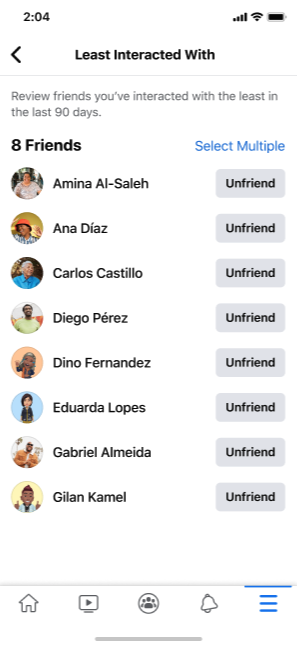
Bulk Unfriending allows users to review their network using smart categories and remove multiple friends at once.
The tool introduced three key ideas:
Categorical sorting
Users can review friends based on signals like:
Least interacted with
No mutual friends
Friends you unfollowed
These categories help users quickly identify connections that may no longer be relevant.
Batch actions
Users can select and remove multiple people in one flow.
Low-friction discovery
The feature is surfaced through multiple entry points to reach users when intent is highest.

My role
As the content designer on the project, I helped shape how the feature worked and how users understood it.
My responsibilities included:
defining the product narrative and value proposition
designing the category system
writing the landing page and in-product education
crafting messaging across multiple surfaces
collaborating with PM, PD, and UXR to refine the experience
Designing the content
The landing screen needed to accomplish several things at once:
explain what the tool does
introduce the value of categories
guide users toward the permanent entry point
remain clear and globally localizable
I wrote concise educational content that explained the feature while keeping the UI lightweight.
Designing the entry point
problem
A powerful tool is only useful if users can find it.
We needed to determine where Bulk Unfriending should live permanently and how users would discover it.
Decision
We placed the permanent entry point in Friending Home, where users already manage their network.
This made the feature:
contextually relevant
easy to revisit
consistent with existing mental models
To increase discoverability, we also tested a tooltip that introduced the feature in context and chaining opportunities on Profile that was only triggered if a user made 3 or more unfriending actions within a short period of time. I led the cross-functional discussions to have this chaining event and content approved by the team that manages these screens.
Chaining event on Profile
Once the tool existed, we explored how to reach users with high intent to unfriend. One effective moment occurs immediately after someone unfriends a person. We introduced a toast upsell that appears after the action, suggesting the Bulk Unfriending tool. This allowed users already in an unfriending mindset to continue the task more efficiently.


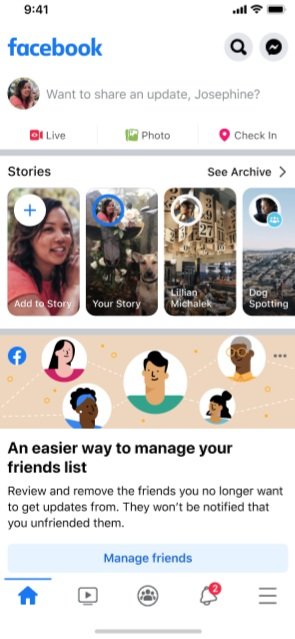
Additional Discovery: Feed Promotion
We also experimented with contextual promotion in Feed. Because unfriending directly affects what users see in their Feed, this surface allowed us to connect the tool’s value proposition to users’ everyday experience. The messaging highlighted that removing people from a friend list reduces the likelihood of seeing their updates.
Impact
The Bulk Unfriending tool improved how users manage their networks and reduced friction in an otherwise tedious task.
Results included:
increased use of friend-management tools
higher completion rates for unfriending sessions
improved confidence sharing content
more pending friend requests accepted
What I learned
This project reinforced an important lesson: solving a task efficiently often requires solving decision friction, not just action friction.
Users didn’t just need the ability to remove multiple friends.
They needed help identifying who to remove.
Designing the category system transformed the feature from a simple bulk action into a decision-support tool.